Categories
Background

Court innovations at the Code for America Summit

2015-09-30 12.06.10

I’m excited to be speaking at the Code For America Summit this week in Oakland — and trying to make the bridge between the robust & big-energy civic tech world, and the world of legal innovation.

Very excited to see a small subset of people interested in making the government better (more accessible, more user-friendly, more engaging) who are also interested in courts and the justice system. Look at this unconference proposal for tomorrow:
2015-09-30 12.06.16

Categories
Background

My (sketched) vision of the future of accessible legal services

How can we help people on-ramp into the legal system in much easier & accessible ways? This is the solution that’s been growing in my mind (but still obviously a little rough) over the last few months.

Accessible Legal Services

We need to invest in several layers at once:

1) The especially hard one: Building a central repository (or a smart, organized network) of all the information about legal services that people need when they are figuring out what legal help they need & how they can get it. This includes: basic legal info about options and procedures, eligibility info about what they qualify for, service options and hand-offs to people/orgs who can help them, know your rights materials that help them spot legal issues and respond to them quickly.

2) The more designerly one: Building better tools, interfaces, and user-facing services that help people access information from this central repository in a clean, just-in-time, quick way. These are the apps, websites, kiosks, in-person meetings, SMS channels that let a person find the right help for them right when they need it.

3) The flashier one: Building a single, memorable brand that lets a person know that the legal help they’re accessing is trustworthy, up-to-date, and right for them, and that is sticky enough that they can remember it if they’re in an emergency or just far away from lawyers.

A lot to do, I know — but an exciting one, and something that is not impossible. I have been experimenting in this second camp over the past few years — with websites & SMS channels that would let people find and access content in user-friendly ways. But I keep coming back to camp #1 & #3. We need all three in order to build a truly accessible & 21st century system of legal services.

I’m excited to be working with Open Referral & others on starting to think about how #1 is achievable, at least in a small Bay Area pilot.

Are you interested in any of these 3 undertakings? Let me know!

Categories
Ideabook Triage and Diagnosis

Can we improve how we deliver legal help via the Internet?

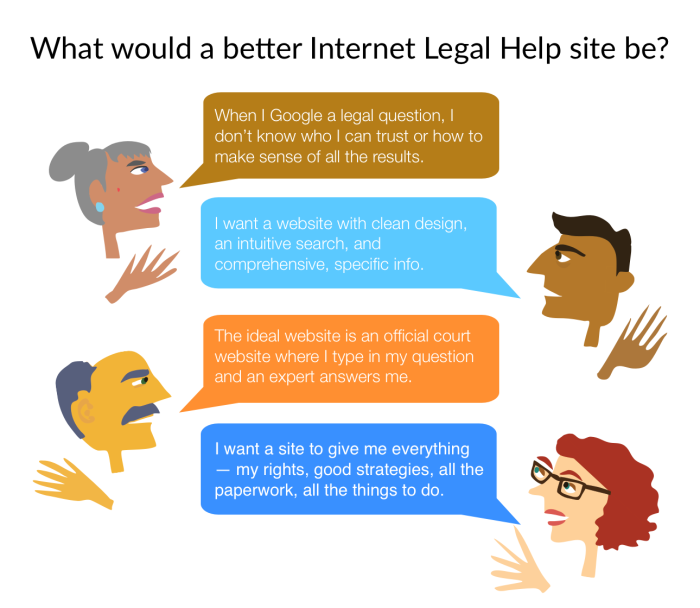
This week I have been finishing up my research paper on what user-centered standards for better online legal help sites would be. I had surveyed lay adults about how they’ve used the Internet in the past to respond to legal issues, and then also had them do some searches for legal help & reviews of certain legal help websites.

I’ve been playing around with small graphics to sum up some of the comments that the users have reported back. Here is one such visual:

Internet for Legal Help user voices

In addition, at Legal Design Lab we have started a working group around this topic specifically. You can read about our process here, and our outcomes, standards, and work here.

Categories
Ideabook Procedural Guide

One-Page Self-Help worksheets

I have been sketching out some possible templates for what a good one-pager worksheet would be, to guide a lay person through a legal process. The he one-pager has limits, so instead of thinking about it as a total ‘process guide’, I’m thinking of it more as an ‘orientation tool’ that gives the person their bearings in a legal area, with some key terminology, major red flags and warnings, and an overview of what to be doing.

As for composition, my thoughts have been to prioritize white space (not try to cram information on), use icons & faces as accents & markers on the page, and show priority through font size & spaces.

The header is also key — I’m thinking that along with the title of the procedure, the header can also give a ranking about how difficult the procedure will be. This could be a way to encourage the user not to do too much on their own, and seek out expert help while going through it.

image

image

Categories
Current Projects Integration into Community

How can social service providers get people to legal help?

During my Spring 2015 class at Stanford d.school/Law School on Intro to Legal Design, we were lucky enough to have Sacha Steinberger visit us and present on her Project Legal Link. I drew up some notes during her presentation, about what she’s working to do — bringing social service providers into the world of legal services.

Here are my sketches:

imageimage

image

Even if a social service case worker spots legal issues in their client’s situation, they often don’t know how to effectively reach out to get legal help for the client.

image

Sacha has identified the social service caseworker as a key ‘legal portal’ — someone who can help get lay people to legal services that they need, and start them on the journey to resolving their problems around housing, debt, relationships, employment, custody, and other common problems that people have and don’t know there is legal recourse for.

image

So what does Project Legal Link do, to help improve social services’ capacity to serve as an effective legal portal?image


image

image

The ideal new workflow would be that social service providers would be this portal, and would do the following:

image

Sacha’s approach is to make it easy for social service providers to know what to do when spotting legal issues and referring for legal help — and empower them to serve their client in fuller ways.

image

image

With smarter caseworkers, then the client will get a fuller team of people to help them.

image

Categories
Background

Why are government and court websites so bad?

I was delighted that one of my favorite new podcasts, Reply All, spent an episode in August all about horrible government websites (see Sam.gov as prime example 1) — and how they got that way.

why are govt websites so bad - open law lab

When we talk about terrible websites, it’s not just that they look like they’re from 1999 (though that’s definitely a part of it). It’s also that the processes are burdensome, unclear, and made even more so with bad web experience and interaction design.

The podcast goes into the regulatory environment around procurement and IT, that leads

  • to bad purchasing decisions (not enough young, cutting-edge vendors can make it through all the requirements and procedures to submit a bid),
  • to out-of-date tech (the yearslong lags between RFPs and roll-outs),
  • to dysfunctional govt-vendor relationships (not enough of the right kinds of requirements or metrics to actually lead to usable, useful sites — or to coordinate the many sub-contractors into a unified project).

All of it adds up to hugely expensive sites that are not usable for the target audiences, and that aren’t flexible enough to adapt to changing times’ standards of what good, trustworthy, engaging, confidence-inspiring websites look like.

This certainly isn’t just a federal government agency problem. The same bad-outdated-confusing website criticism applies to most every court website I have experienced.

Now my question is what kinds of regulations & organization structures need to be changed to get courts to make better purchasing decisions — that could make for more agile development processes, that mean more guarantees of interfaces & tools that the users can actually use, and that are flexible enough to stay current easily.

Categories
Ideabook Triage and Diagnosis

Google Legal Health Checkup, for privacy

A few weeks ago, when I logged into my browser, I got a notice from Google that they wanted to walk me through a Privacy Checkup of my Google Account. I agreed, more to observe how they treated me as a user & how they guided me through the experience of understanding my status quo & revising my options to be more in line with my preferences.

This kind of intervention could be useful for privacy interventions — but also for other ‘legal health checkups’. I am curious about how to attract people to pay more attention to possible legal remedies for their ‘life problems’ and then seek out help from lawyers, guides, software, etc. that could guide them towards being prepared & smart about the law.

So what was the Google Privacy Check-up intervention like? Here are the screenshots from it:

Google Privacy Check Up intervention - Screen Shot 2015-06-24 at 3.13.39 PM Google Privacy Check Up intervention - Screen Shot 2015-06-24 at 3.13.49 PM Google Privacy Check Up intervention - Screen Shot 2015-06-24 at 3.13.56 PM Google Privacy Check Up intervention - Screen Shot 2015-06-24 at 3.15.08 PM Google Privacy Check Up intervention - Screen Shot 2015-06-24 at 3.16.05 PM Google Privacy Check Up intervention - Screen Shot 2015-06-24 at 3.16.16 PM Google Privacy Check Up intervention - Screen Shot 2015-06-24 at 3.16.25 PM

Even if I had not been analyzing this experience as a designer, I would have clicked on & completed this privacy check-up. It was easy to use, and it gave me interesting information about me (and like most people, I expect, it’s really interesting to learn more about me — or the alternate version of me that Google has compiled). Most importantly, it gave me a sense of choice and agency — I was able to tell Google what I wanted (within reason) and have them do it. That is a very satisfying accomplishment for a few minutes of clicking.

What are the takeaways for this when it comes to access to justice?

We could be doing compelling legal health check-ups just as we do privacy check-ups. Here’s a skeleton of the process:

  1. Reach out to the person, hopefully in a context (like the Google search) that relates to what you’re checking up on, so that they feel primed to engage on the topic
  2. Give them insights into their own status quo — tell them something about themselves that they don’t already know, or that frames it in an interesting way. It’s almost like a Buzzfeed ‘which kind are you’ quiz. Or here, where Google tells you who they think you are & what your preferences are.
  3. Tell them possible outcomes from their status quo. Give them a sense of what may come down the road — bad consequences, good ones, how they’ll be treated, what they’ll get — if they continue on with their current situation.
  4. Provide action steps in which they can immediately change their status quo — whether it’s by setting goals/preferences, taking a step to resolve a problem, reaching out to someone else for hep. Embed easy follow-up action into this review, so that the person can immediately exert their agency (while they’re still thinking about it, and while their preferences & long-term thinking are at the forefront).

That kind of service design could help loop people into taking care of their legal health — whether it’s making an estate plan or dealing with housing, employment, or financial problems they’re having.

Categories
Ideabook Integration into Community

211 Portal – One call for your legal help

http://i0.wp.com/www.openlawlab.com/wp-content/uploads/2015/05/IMG_20150504_160828.922.png

Could we build a single portal to all kinds of legal support, help, counsel? If it’s a simple, memorable number that’s the same across the country — that would be terrific from a branding approach.

The LSC-TIG Summit last year listed centralized state-by-state legal portals as one of their central agenda items, and it would be terrific to see this happen.

Categories
Ideabook Work Product Tool

All-in-one Client-Attorney Collaboration Platform


What would an all-in-one collaboration platform look like, for clients & lawyers to work together? If there could be one place that coordinates a person’s journey from having a legal problem, to seeking help, to actually carrying through resolution of the problem — it could help reduce so many of the barriers to getting legal things done, and increase a person’s sense of control and empowerment.

Categories
Ideabook Wayfinding and Space Design

Court traffic monitor

Legal_Design_Concepts - court traffic
Could we create a Schedule & Alert system to let litigants and court people know what the busy-ness & traffic level are?

Especially for litigants who have a choice about when they come into court (say to contest a traffic ticket) – couldn’t we help them decide when to come in, so that they can be in the least possible traffic.

It could be available online, on a website. You enter in your type of hearing and court building, and then you see approximate wait times. You could even get live reports if you’re thinking about going on a specific time today.